





Help
This page has been designed to walk you through the site from searching for a piece of jewellery, selecting the piece for purchase and finally explaining the checkout and payment process.
- How to search the Bridal-Jewellery.co.uk site
- How to add jewellery to your
basket
- How to check the contents of your basket
- How to Checkout of Bridal-Jewellery.co.uk
- How to Pay
If you cannot find the information you are looking for on this page or need additional help in ordering then please contact us.
Searching the Bridal-Jewellery.co.uk Site
Searching for the right piece of Jewellery on Bridal-Jewellery.co.uk could not be easier. We have categorised our bridal jewellery into four main areas:
Wedding Tiaras
Wedding Necklaces
- includes chokers, pearl, crystal and diamante styles.
Wedding Earrings
Wedding Sets
The four categories can be found on the home page, on the navigation bar and at the bottom of all pages.
You can also use the 'Search' box which can be found on every page.
How to add jewellery to your basket
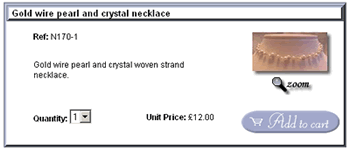
When you have found a piece of bridal jewellery that you would like to purchase, just select the quantity you would like to order and press the Add to Cart button (as shown below). The jewellery will then be added to your basket.
If you also want to see a larger picture of the jewellery, you can also press the Zoom button (as shown below), this will open a new pop up browser window displaying a larger picture of the jewellery.
How to Checkout of Bridal-Jewellery.co.uk
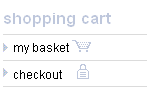
When you have finished shopping you can press checkout on the left hand side of the screen (as shown below) to complete your order.
You can then check your order and then proceed to filling in your delivery details and payment details on the screens that follow.
How to check the contents of your basket
To review the contents of your basket at any time, click the
my basket link on the left of the screen (as shown below).
After clicking my basket you will be presented with a list of all the jewellery items that are currently in your basket (as shown below).

How to Pay
This section will guide you through the checkout and payment process in order for you to successfully complete your Bridal-Jewellery.co.uk order.
Click on the screen shot image to enlarge it.
Once you have selected your items and selected checkout
or my basket, the following screen will be displayed,
detailing your purchases.
Please select your location for the calculation of delivery
charges, either UK or Southern Ireland.
Then press the recalculate button to have the delivery charge
added to your order.
If you want to continue shopping press the Continue Shopping button or use the back button on your browser.
If you want to take an item out of your basket, change the Quantity to 0 and press the Recalculate button. This will take the item out of your basket.
If you require a necklace extension chain please press the 'click here' link and an extension chain will be added to your order.
Once you are happy with your purchases click the Proceed to Checkout button.
Proceed to Checkout
This page allows you to enter your personal details.
The address details should be the the same address details as the debit/credit card holder that you are using for this transaction.
The jewellery items will be sent to this address.
The Email address entered will be used in order to send you a confirmation of your Bridal-Jewellery.co.uk order, and will be used to send you dispatch information.
If you do not enter an Email address, a confirmation Email cannot be sent.

All fields in BOLD must be completed.
Clicking on Continue presents you with the following screen, this allows you to check your details.

Clicking continue again, brings you into our secure area in which you can enter your payment details.
We can currently process your payment through PayPal, so you will need a PayPal account in order to purchase from us.
Then click on Continue to complete your order.
If your order has been successfully completed the following screen will be displayed together with your Order No.

If there have been any errors with processing your payment details, the following screen will be displayed and you will be able to amend your payment details.